To get started go to the downloads page and download the latest version.
Ignore any security warnings during the download. If you get a blue box that “Windows protected your PC” click the discrete “more info” link at the top left and select “Run Anyway”
When the program starts it tries to do 3 things:
- Locate the HOMM3 game process
- Locate your player profile in memory
- Locate your Heroes in memory
This can only succeed if the game is already running and you have loaded a map. If any of the 3 events fail, a warning message will appear and the program will exit. If you are in a map and you get an error message please let me know.
Once your heroes are found the main window opens and the hero data of the fist hero is displayed, like so:
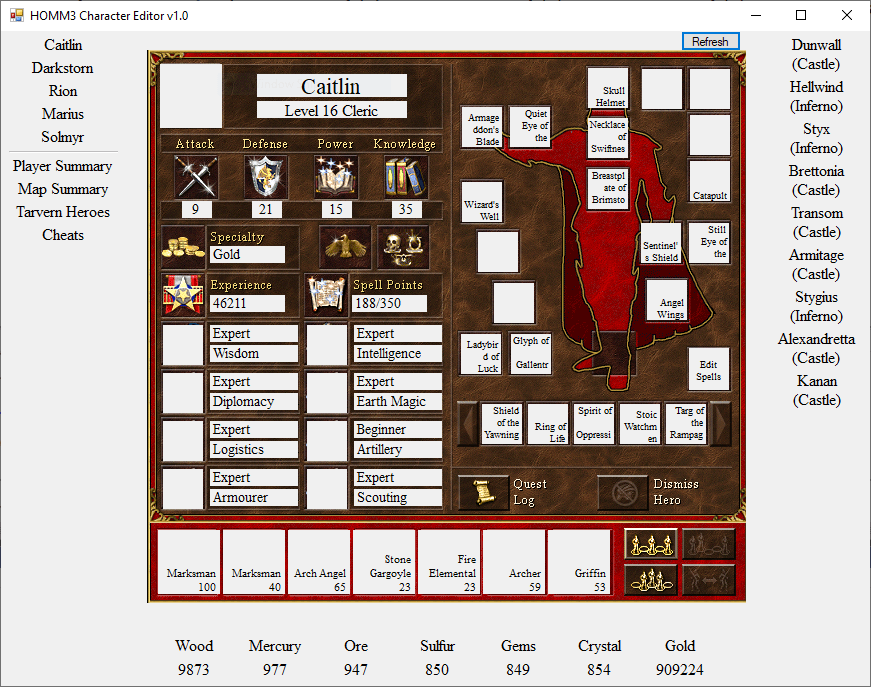
The main window has 4 regions:
- Heroes in your party
- Towns you own
- Resources and Gold you have accumulated
- Extra options
Hero Data
When you select a Hero name from the list, the follow options are available:
- Edit hero stats: Attack, Defense, Power and Knowledge
- Edit hero specialty
- Edit active secondary skill
- Edit active secondary skill levels
- Edit army
- Edit artifacts
- Edit spells
All interactions aside from “Edit spells” have the same behavior. First click on the grey label, then edit the value on the panel and then select “Set”. When editing creatures in your army, it will always give you 100. When editing secondary skills, it will always set them to Beginner.
When you select “Edit spells” a large menu will appear with all the spells displayed. Simply select the ones you want and then click “Set”. If your hero does not have a Spell Book, it will also be added to your inventory.
When you make changes to your character in the game, click the “Refresh” button in the top corner to have these changes reflected in the character editor.
Town Data
The town data is currently limited to listing your town names. Additional features will be available in later versions.
Resources and Gold
To edit your resources and gold simply click on any of the numerical values. A panel will appear that you can edit. Hit enter or click set to overwrite the value. Click cancel to abort.
Extra Options
Map summary will list all the towns on the map and allow you to edit the Garisson hero.
Tavern Heroes will allow you to update the Heroes you have available to buy at the Tavern.
Player Summary and Cheats will be available in a later versions.
 HOMM3 Character Editor